
STVS VPN
Remote access for STVS
Download the file
-
aarch64 (64-bit)
STVS_VPN_1_1_1_aarch64.eap
d9ffac30873963c802fd32b581f1394de2bc2ff92e46077e0c3799eb9fd712e1 -
armv7hf (32-bit)
STVS_VPN_1_1_1_armv7hf.eap
57cf49aebcdf1c503b069835762a97503c3333ce6bcded765faf8d9c28be7e9c
Which file do I need?
Axis cameras come in two kinds, aarch64 and armv7hf, and each has its own file. Only the matching one installs.
Read it from the camera
Sign in to the camera, open the Apps page and click Add app. The dialog shows the camera's architecture.
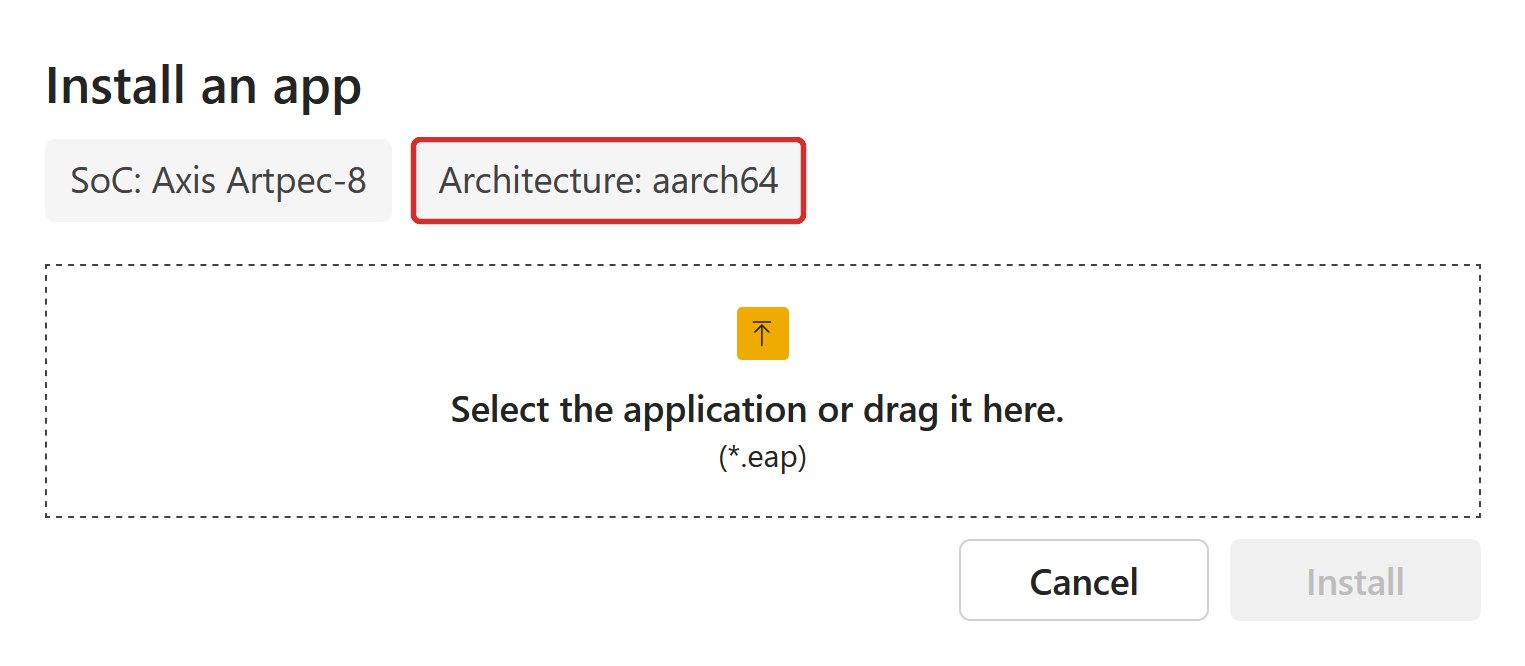
Not near the camera and not sure? Download both files. The camera refuses the wrong one with an error and nothing is changed.
To check the download, compare its SHA-256 checksum with the one shown here. On Windows: certutil -hashfile FILE SHA256. On macOS or Linux: shasum -a 256 FILE.
Install it on the camera
- In your browser, open http://camera-ip/ and sign in as administrator.
- Open the Apps page (in the left menu).
- Click Add app, choose the file you downloaded, and click Install.
- When the app appears in the list, switch it on.
- Click the app to open its settings page and follow the instructions there.
If the camera says the app is not compatible, you picked the other kind of file. Check which file your camera needs, above.
Need help? Contact STVS through https://www.stvs.com.
All versions
1.1.1 · Published 2026-10-29
Changelog
- The bundled VPN client is updated to 0.81.5.
- The live app log view now follows the app's own daily log instead of the camera's system log, so it shows everything the app logged that day.
- A log tail cut at the 200 KB limit now starts on a whole line instead of a fragment.
- Stored log files are no longer labelled as archived, since the list also includes today's file.
Files
-
aarch64 (64-bit)
STVS_VPN_1_1_1_aarch64.eap
d9ffac30873963c802fd32b581f1394de2bc2ff92e46077e0c3799eb9fd712e1 -
armv7hf (32-bit)
STVS_VPN_1_1_1_armv7hf.eap
57cf49aebcdf1c503b069835762a97503c3333ce6bcded765faf8d9c28be7e9c
1.1.0 · Published 2026-09-18
Changelog
- The bundled VPN client is updated to 0.78.2.
- Lazy connections now follow the account setting on the management server instead of a per-device toggle.
- The watchdog no longer restarts the VPN service during a management outage while peers are still connected.
- Daily VPN service logs are now named vpn_YYYY-MM-DD.log.
- The setup key field shows the key in plain text, so a paste can be checked and browsers no longer offer to save it as a password.
Files
-
aarch64 (64-bit)
STVS_VPN_1_1_0_aarch64.eap
af6a766a20545d2e2f2272617ab63ea0d030520bcf49143c9e305fc84d80aa8a -
armv7hf (32-bit)
STVS_VPN_1_1_0_armv7hf.eap
97adf7caca978eddb03d8aa02967481f05518f97245f9dbd488897b42fe88163
1.0.0 · Published 2026-09-04
Changelog
- Initial release of the VPN ACAP for Axis cameras, managed from the camera's settings page.
- VPN lifecycle from the camera: enroll with a one-time setup key, connect, disconnect, reconnect, restart the service and deregister. Deregistering wipes the enrollment while keeping the app's settings and log archive.
- Lazy connections, on by default: peer tunnels come up on demand rather than all at once.
- Tunnel settings for the WireGuard listen port, MTU and interface name, plus an external IP map that advertises a router's public address to peers behind CGNAT or hard NAT.
- Live tunnel status, a detail view of the full daemon state, and a searchable, sortable table of peers with connection type, latency and transfer counters.
- A watchdog that restarts the VPN service when the management connection stays down or the daemon exits, with a configurable timeout.
- On-device logs with daily rotation and configurable retention, an in-browser viewer with a live tail, downloadable support bundles and a built-in iperf3 server for throughput testing.
- The settings API is reachable only through the camera's reverse proxy and requires administrator authentication; setup keys are never stored by the app or exposed on the command line.
Files
-
aarch64 (64-bit)
STVS_VPN_1_0_0_aarch64.eap
8afb4e95258e8aeb641e2fbc250cb667bb44d4dd0e161197d3cfb8835fd47205 -
armv7hf (32-bit)
STVS_VPN_1_0_0_armv7hf.eap
5713129224541fe1ef0eff954f6c528a7a55cb37cdde04b4d71446bab79c6707